PGN meaning
PGN stands for Parameter Group Number.
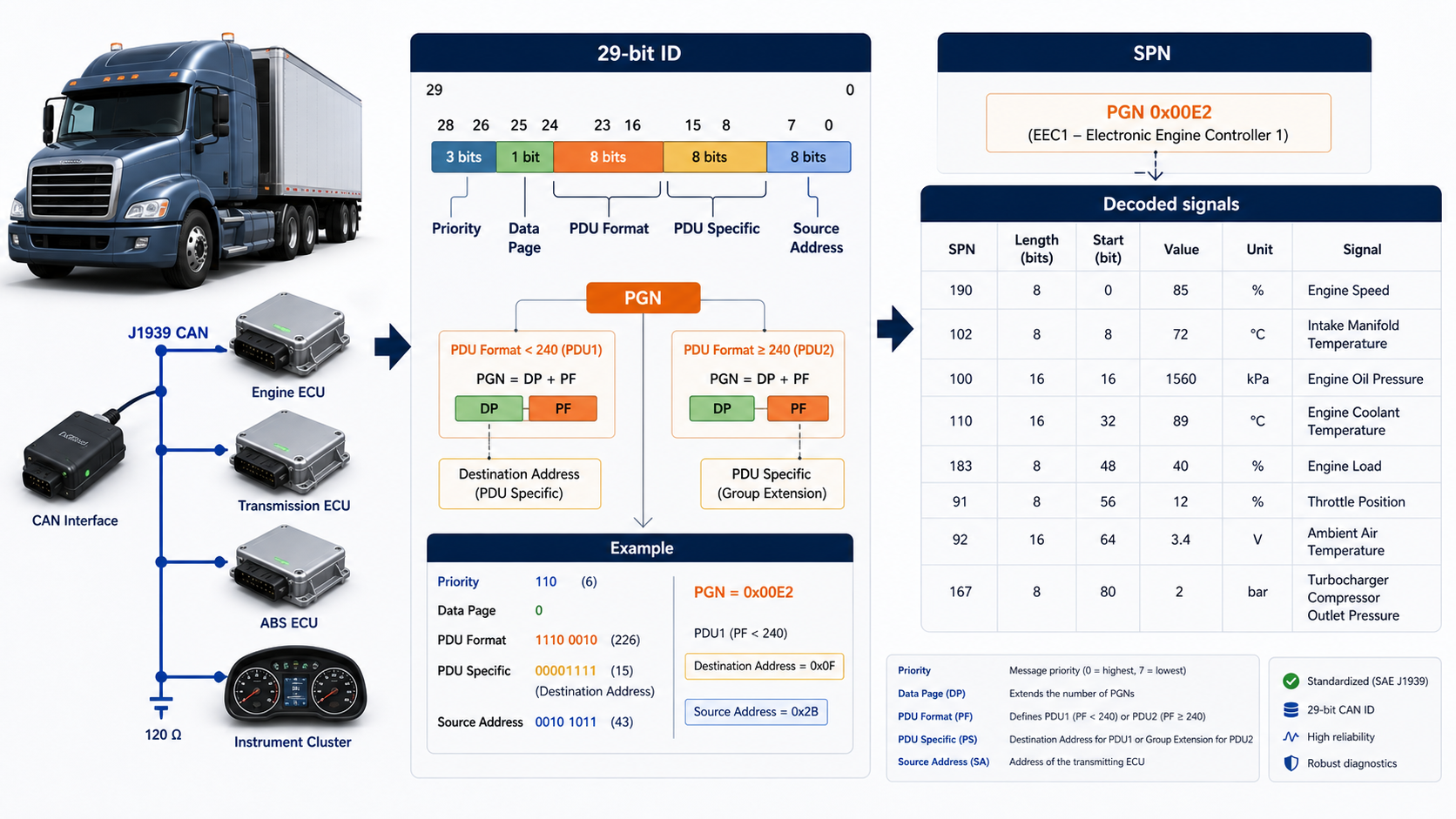
In J1939, the PGN tells you what type of message a CAN frame carries. It is derived from the 29-bit CAN ID.
The easiest mental model is:
CAN ID -> PGN -> SPNs -> engineering valuesFor example, a PGN can represent an engine controller message. SPNs inside it can represent engine speed, torque, and operating state.
The J1939 CAN ID
A J1939 identifier contains these fields:
Priority | Reserved | Data Page | PDU Format | PDU Specific | Source Address
3 bits  |   1 bit  |   1 bit   |   8 bits   |    8 bits    |     8 bits
The source address is the last byte. The PGN comes from the middle fields.
The PDU1 and PDU2 rule
This is the one PGN rule that causes most mistakes.
- If PDU Format is below 240, the frame is PDU1. PDU Specific is a destination address and the low PGN byte becomes
00. - If PDU Format is 240 or above, the frame is PDU2. PDU Specific is part of the PGN.
That means you cannot always extract a PGN by simply shifting the CAN ID right by eight bits. For PDU1 messages, you must clear the destination byte.
Python function to extract a PGN
def j1939_fields(can_id: int) -> dict[str, int | None]:
    priority = (can_id >> 26) & 0x7
    reserved = (can_id >> 25) & 0x1
    data_page = (can_id >> 24) & 0x1
    pdu_format = (can_id >> 16) & 0xFF
    pdu_specific = (can_id >> 8) & 0xFF
    source_address = can_id & 0xFF

    if pdu_format < 240:          # PDU1: destination specific
        pgn = (reserved << 17) | (data_page << 16) | (pdu_format << 8)
        destination = pdu_specific
    else:                         # PDU2: broadcast
        pgn = (
            (reserved << 17)
            | (data_page << 16)
            | (pdu_format << 8)
            | pdu_specific
        )
        destination = None

    return {
        "priority": priority,
        "pgn": pgn,
        "source_address": source_address,
        "destination_address": destination,
    }


fields = j1939_fields(0x0CF00401)
print(fields)
print(f"PGN: {fields['pgn']} / 0x{fields['pgn']:04X}")
Expected PGN:
PGN: 61444 / 0xF004PGN example: 61444
PGN 61444 is commonly known as EEC1. A raw log line may look like this:
can0 0CF00401 [8] FF FF FF 40 1F FF FF FFFrom the ID:
0xF004gives PGN 614440x01is the source address- the first part of the ID also carries priority
From the data, the correct J1939 definition tells you which bytes belong to each SPN.
What is an SPN?
SPN stands for Suspect Parameter Number. An SPN identifies one parameter inside a PGN.
A PGN is similar to a DBC message. An SPN is similar to a DBC signal.
| J1939 term | DBC-style comparison |
|---|---|
| PGN | Message type |
| SPN | Signal inside the message |
| Source address | ECU that sent the message |
An SPN definition includes position, length, scale, offset, unit, range, and special values.
Simple SPN decoding example
Suppose the fourth and fifth payload bytes are 40 1F, little-endian, and the scale is 0.125 rpm per bit.
data = bytes.fromhex("FF FF FF 40 1F FF FF FF")

raw = int.from_bytes(data[3:5], byteorder="little")
engine_speed_rpm = raw * 0.125

print(raw)               # 8000
print(engine_speed_rpm)  # 1000.0
Do not copy byte positions from a random example into production code. Use the correct J1939 specification, DBC, or OEM definition for your network.
Common PGN mistakes
Using all 29 bits as the message number
The source address changes between senders. If you match only the complete CAN ID, you may treat the same PGN from two ECUs as two unrelated messages.
Forgetting the PDU1 rule
For PDU1 messages, PDU Specific is the destination address. It is not part of the PGN.
Ignoring unavailable values
J1939 often reserves raw values to mean not available or error. Do not turn those values into normal engineering numbers.
Assuming one frame always holds the full message
Some J1939 parameter groups use the transport protocol to carry more than eight bytes. A raw-frame decoder must reassemble those packets first.
A practical PGN workflow
- Record extended CAN frames.
- Extract PGN, source address, and destination address.
- Count the PGNs to understand the traffic.
- Match each PGN to the correct database definition.
- Decode SPNs with the right byte order and scaling.
- Check unavailable values and message timing.
- Validate results against a known display or test value.
The simple summary
A PGN is the J1939 message number. An SPN is a parameter inside that message. Extract the PGN correctly from the 29-bit CAN ID, pay attention to PDU1 versus PDU2, and then use the right definition to decode each SPN.