DBC updates fail most often in review, not in parsing
Most teams can parse a DBC file. The harder part is reviewing change quality at speed. Signal length changes, scaling shifts, multiplexed branches, or silent comment edits can pass through quickly when the process is line-only and rushed.
A better approach is to use compare modes intentionally: text-level for exact edits and structured-level for semantic meaning. dbcUtility v1.0.3 makes this practical in one place.
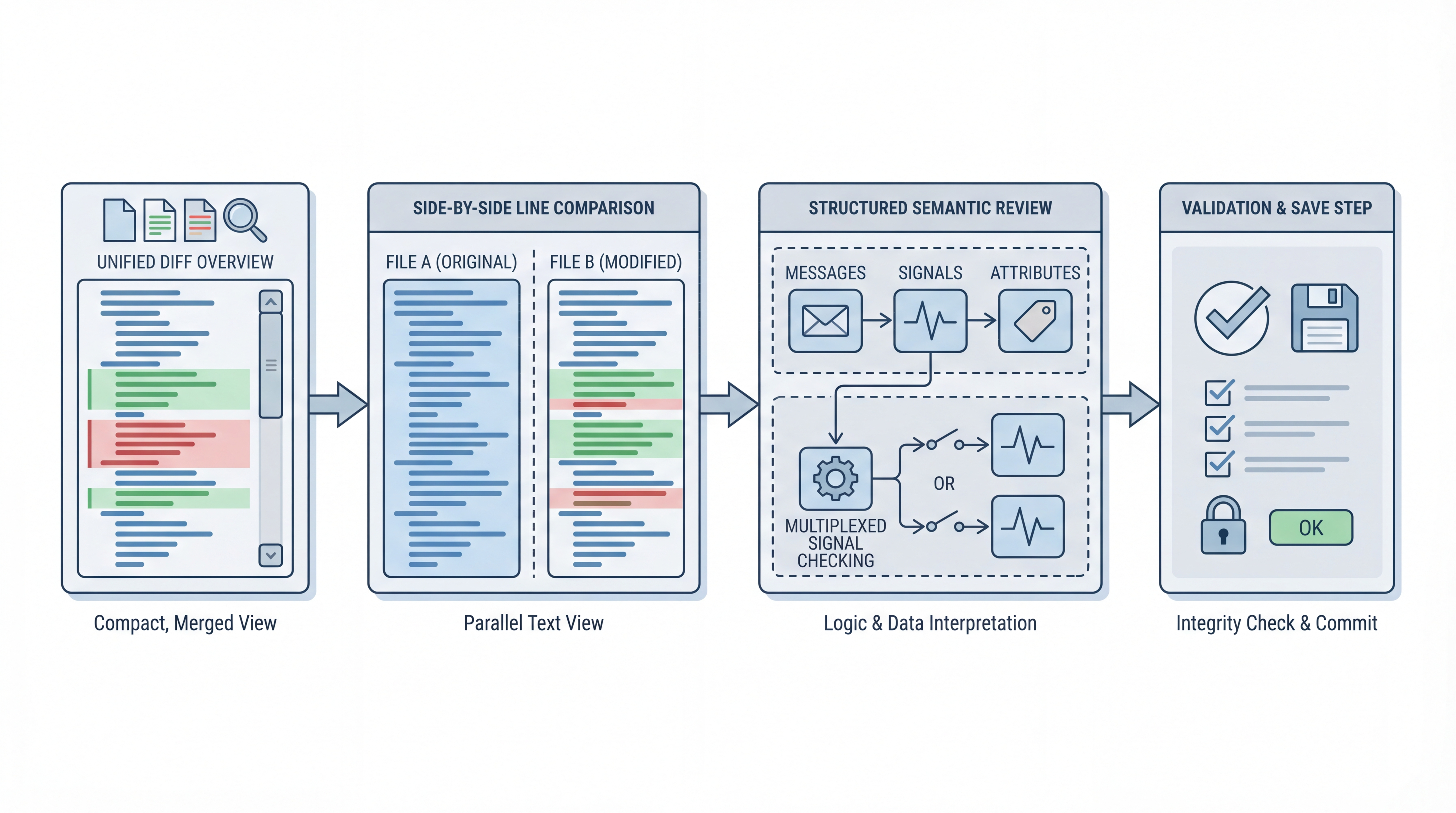
A reliable four-step review routine
1) Start with Unified View for fast scope check
Use Unified View first to answer one question: how big is this change set? This gives immediate context before deep review. If the change footprint is larger than expected, pause and validate source provenance before proceeding.
2) Move to Side-by-Side for exact line edits
Now inspect exact edits and copy direction carefully. Use directional copy only when intent is clear. Side-by-side is where you catch accidental whitespace-only churn, naming drift, or small syntax changes that may be harmless but still noisy.
3) Use Structured View for semantic risk
Structured comparison is the most valuable step for engineering quality because it shows message and signal properties in a semantic tree. Review these fields explicitly:
- frame ID
- signal start bit and length
- byte order
- scale and offset
- min/max and unit
- multiplexing flags and IDs
This is where many high-impact defects become obvious.
4) Save only after targeted validation
Before save, check only the modified regions and confirm intent with the source owner or changelog if needed. Then write changes through the save-review flow. This keeps the process traceable and lowers accidental overwrite risk.
Multiplexer-aware review checklist
If multiplexed signals are present, add this checklist:
- Is the multiplexer signal defined and consistent?
- Are multiplexed branches attached to correct mux IDs?
- Did any branch disappear unintentionally?
- Are warnings addressed before final save?
A small mux mismatch can create large decode errors downstream, so this step deserves deliberate time.
Where teams usually lose time
Common bottlenecks are predictable:
- reviewing only text diffs without semantic checks
- accepting large supplier drops without narrowing scope
- skipping explicit check of scale/offset changes
- missing branch-level multiplexer drift
The cure is not more meetings. It is a repeatable review pattern with consistent checkpoints.
A practical policy you can adopt this week
For every incoming DBC revision:
- Unified scan
- Side-by-side review
- Structured semantic review
- Multiplexer checklist (if applicable)
- Save with documented intent
Even a lightweight version of this policy can reduce regressions and speed up sign-off quality.
How dbcUtility fits this process
dbcUtility v1.0.3 supports all three compare perspectives in one tool, which removes unnecessary switching between diff utilities and editors. For teams already using DBC Utility in daily maintenance, this is a straightforward process upgrade rather than a tooling migration.
Product pages:
Final view
Reliable DBC review is a workflow discipline. The tooling helps, but the win comes from using the right view at the right step. If your team treats every DBC update as a small integration event, not just a file update, defect rates usually drop and confidence rises.