The short version
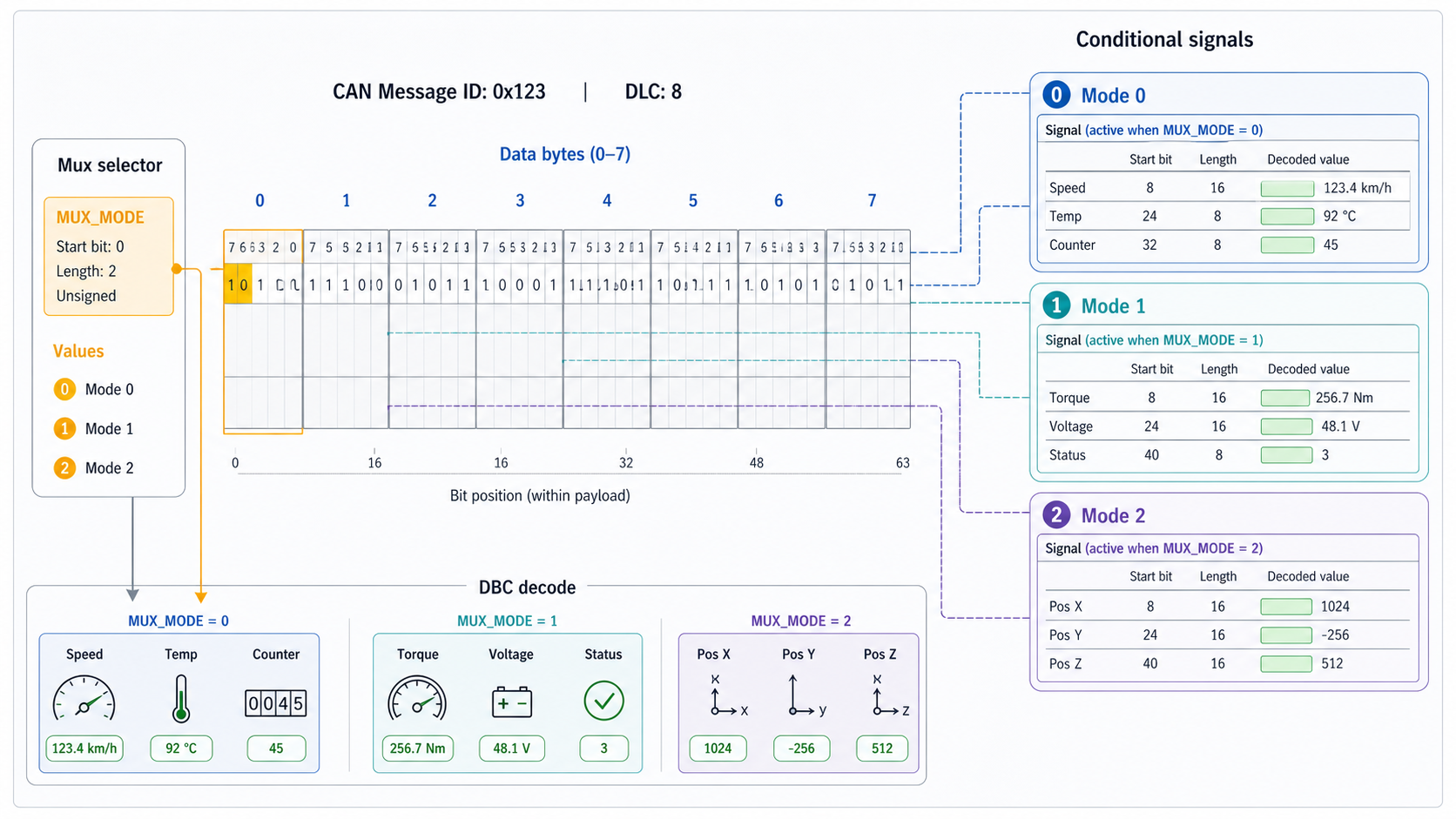
A multiplexed DBC message uses one signal as a selector. That selector decides which other signals are valid in the same payload.
In plain terms:
same CAN ID + same 8 bytes + different mux value = different signal meaningThat is powerful because it lets one frame carry multiple logical layouts. It is also risky because the same bits can mean different things depending on the mux selector.
If your DBC tool or review process hides mux context, you can easily read the wrong signal.
Why multiplexing exists
CAN has limited frame identifiers and limited payload size. Classical CAN gives only 8 data bytes per frame. CAN FD gives more payload, but teams still care about bandwidth, schedule, and compatibility.
Multiplexing helps when an ECU needs to report several groups of data that do not all need to be sent at the same time.
Example use cases:
- diagnostic-like status pages
- mode-dependent sensor groups
- configuration snapshots
- ECU variant data
- periodic groups that rotate through one frame ID
Instead of using five CAN IDs, a team may use one CAN ID with a mux selector.
A simple mux example
Imagine message 0x321, length 8:
Byte 0: mux selector
Bytes 1-7: payload whose meaning depends on the selector
When byte 0 is 0, bytes 1-2 might be motor speed.
When byte 0 is 1, bytes 1-2 might be battery current.
When byte 0 is 2, bytes 1-2 might be temperature and diagnostic flags.
The frame ID is unchanged. The payload position is reused.
What it looks like conceptually
CAN ID 0x321

Mux = 0
  MotorSpeed       bits 8..23
  MotorTorque      bits 24..39

Mux = 1
  BatteryCurrent   bits 8..23
  BatteryVoltage   bits 24..39

Mux = 2
  Temperature      bits 8..15
  FaultFlags       bits 16..23
The signal positions overlap, but not at the same mux value. That overlap is expected.
DBC terms you need to know
Most DBC tooling talks about:
- multiplexer signal: the selector signal
- multiplexed signal: a signal that is valid only for one mux value or mux range
- mux value: the selector value that activates a signal
- normal signal: a signal always valid regardless of selector
The confusing part is that DBC syntax is compact. A small marker in the signal line can change how the entire message should be decoded.
Decode with cantools
cantools understands normal DBC multiplexing.
import cantools

db = cantools.database.load_file("vehicle.dbc")
message = db.get_message_by_frame_id(0x321)

for payload in [
    bytes.fromhex("00 68 13 10 00 00 00 00"),
    bytes.fromhex("01 F4 01 20 03 00 00 00"),
    bytes.fromhex("02 5A 0F 00 00 00 00 00"),
]:
    print(message.decode(payload, decode_choices=False))
A good decoder should return only the signals valid for the active mux value, plus any always-valid signals.
The most common mux mistakes
Watch for these in DBC review:
- mux selector start bit is wrong
- mux selector length is too short
- signal assigned to the wrong mux value
- signal should be always valid but was made mux-dependent
- signal is duplicated across mux branches with inconsistent scale
- overlapping bits exist outside valid mux branches
- default or unknown mux values are not documented
- generated code and analysis tooling handle mux ranges differently
The highest-risk mistake is a wrong mux selector. If the selector is wrong, every dependent signal can decode under the wrong branch.
How to review a mux-heavy DBC
Do not review a mux-heavy message as one flat signal list. Review it by branch.
Recommended workflow:
- identify the mux selector
- list each mux value
- inspect the signals active for that value
- check bit overlap only within the same branch
- decode sample payloads for each branch
- compare against real logs
- review changes branch by branch before release
For a large mux message, a table helps:
Mux value | Branch name       | Critical signals          | Test payload available
0         | Motor page        | MotorSpeed, MotorTorque   | yes
1         | Battery page      | BatteryCurrent, Voltage   | yes
2         | Thermal page      | Temperature, FaultFlags   | no
If a branch has no sample payload, that should be visible in release review.
Test all branches with log replay
Mux bugs often hide because the test log only contains one branch.
Check coverage:
from collections import Counter
import cantools

db = cantools.database.load_file("vehicle.dbc")
message = db.get_message_by_frame_id(0x321)
mux_signal = next(signal for signal in message.signals if signal.is_multiplexer)

counts = Counter()

with open("capture.log", "r", encoding="utf-8") as handle:
    for line in handle:
        parts = line.split()
        if len(parts) < 4 or parts[1].lower() != "321":
            continue
        data = bytes.fromhex("".join(parts[3:]))
        decoded = message.decode(data, decode_choices=False)
        counts[decoded[mux_signal.name]] += 1

print(counts)
The parser for your log may differ, but the idea is the same: count mux values before trusting branch coverage.
Multiplexing and CAN FD
CAN FD reduces some pressure by allowing larger payloads, but multiplexing still appears in CAN FD databases. Teams may use it for mode-dependent layouts, compatibility, generated protocol patterns, or diagnostic pages.
The review rule is the same: decode by branch, not by flat signal list.
Where DBC Utility fits
DBC Utility helps when you need to inspect a multiplexed DBC without losing context. For mux-heavy files, the useful workflow is:
- open the DBC
- inspect the message and mux selector
- review dependent signals
- compare old and new definitions
- check risky branch changes before saving
Related reading: