Why log format choice matters
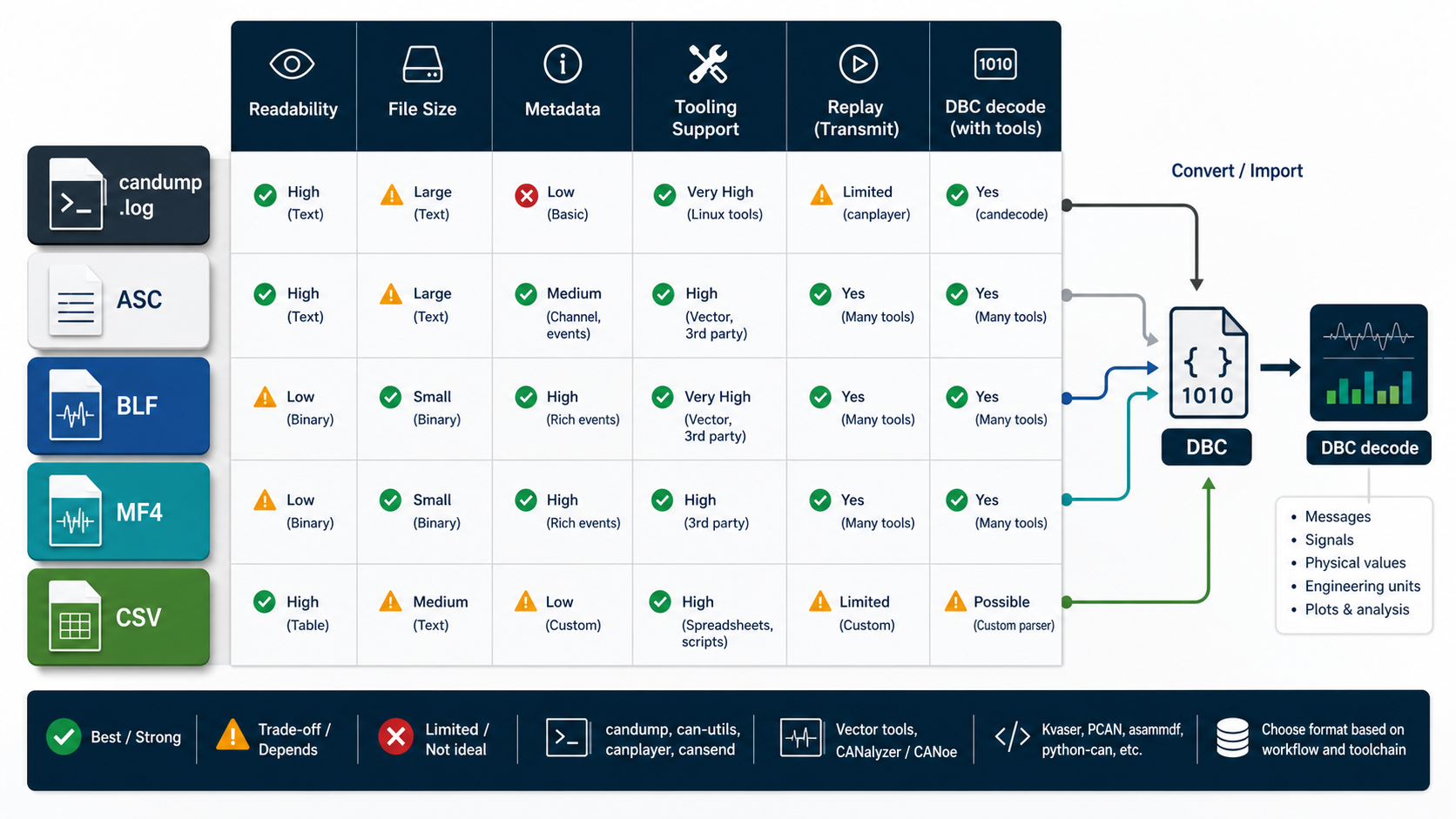
CAN logs are not all the same. A file that is perfect for quick Linux debugging may be weak for long-duration fleet data. A compact binary format may be efficient but annoying for code review. A CSV may be easy to open in Excel but poor for replaying exact bus traffic.
Pick the format based on the job.
Common CAN log formats:
- candump
.log - ASC
- BLF
- MF4 or MDF
- CSV
The DBC file is separate. The log records frames. The DBC gives those frames meaning.
candump logs
candump logs are common in Linux SocketCAN workflows.
Example:
(1716381000.123456) can0 321#6813FFFF401F0000
(1716381000.124010) can0 123#1122334455667788
Strengths:
- easy to generate on Linux
- readable enough for quick debugging
- works well with can-utils
- can be replayed with
canplayerwhen captured in a compatible format - good for small to medium bench captures
Weaknesses:
- metadata is limited
- channel naming can be environment-specific
- large files can become awkward
- long-duration fleet use needs additional structure
Capture:
candump -tz -L can0 > capture.logReplay:
canplayer -I capture.logUse candump logs when you need fast Linux bring-up, bench debugging, and repeatable local testing.
ASC logs
ASC is a text-based CAN trace format used in many automotive workflows.
Strengths:
- text-based
- common in toolchains
- easier to diff than binary logs
- can represent timestamps, channels, IDs, DLC, and payloads
Weaknesses:
- larger than binary formats
- dialect details can vary by exporter
- parsing needs format-aware tools
ASC is a good interchange format when humans may inspect the log and the file size is manageable.
With python-can:
import can

for msg in can.LogReader("capture.asc"):
    print(msg.timestamp, hex(msg.arbitration_id), msg.data.hex())
BLF logs
BLF is a binary log format often used in Vector-oriented ecosystems.
Strengths:
- compact compared with text
- good for larger traces
- widely recognized in automotive tooling
- can preserve richer trace metadata depending on exporter
Weaknesses:
- not human-readable
- less convenient for code review
- tool support matters
Use BLF when file size and tool compatibility matter more than direct text inspection.
With python-can:
import can

reader = can.LogReader("capture.blf")
for msg in reader:
    if not msg.is_error_frame:
        print(msg.timestamp, hex(msg.arbitration_id), bytes(msg.data).hex())
MF4 and MDF logs
MF4 is part of the MDF measurement data family. It is common for measurement and logging systems that need more than raw CAN frames.
Strengths:
- strong for long-duration measurement data
- can store multiple channels and metadata
- common in validation and fleet-style workflows
- suitable when CAN is only one part of the measurement set
Weaknesses:
- heavier format
- needs specialized libraries or tools
- not ideal for simple command-line replay
Use MF4 when you care about measurement context, long recordings, and multi-signal datasets.
CSV logs
CSV can mean two different things:
- raw frame CSV
- decoded signal CSV
Raw frame CSV:
timestamp,channel,id,dlc,data
1716381000.123456,can0,0x321,8,6813FFFF401F0000
Decoded signal CSV:
timestamp,message,signal,value,unit
1716381000.123456,EngineData,EngineSpeed,621,rpm
Strengths:
- easy to open in spreadsheet tools
- easy to process with Python
- good for decoded signal analysis
Weaknesses:
- poor for exact replay unless carefully designed
- can lose metadata
- inconsistent schemas across teams
- large files become slow
Use CSV for reporting and analysis, not as your only source-of-truth raw log format.
Raw logs versus decoded logs
Keep raw logs when possible.
Decoded logs are useful, but they depend on:
- DBC version
- decode script version
- filtering decisions
- unit conversion
- interpolation or forward-fill behavior
- invalid-value handling
If a decoded value looks wrong later, you need the raw frame and the DBC version to reproduce the result.
Recommended workflow
For most engineering teams:
- capture raw frames in a replayable format
- store the DBC version used for decoding
- export decoded CSV only as a derived artifact
- keep unknown IDs and decode errors in the report
- preserve timestamps and channels
- document CAN FD settings when used
Example folder:
test-run-042/
raw/
  capture.log
dbc/
  vehicle-release-17.dbc
decoded/
  signals.csv
notes/
  test-context.md
Which format should you choose?
Quick guide:
Linux bench debugging       -> candump log
Human-readable interchange  -> ASC
Large proprietary traces    -> BLF
Measurement campaigns       -> MF4/MDF
Signal analysis/reporting   -> decoded CSV
Exact replay                -> keep raw frames
The best format is the one your team can reliably capture, decode, review, and reproduce.
Where DBC Utility fits
DBC Utility does not replace your logger. It helps with the database side:
- inspect the DBC used for decoding
- review signal definitions before analysis
- compare DBC versions used across logs
- catch risky DBC changes before derived CSV files are trusted
Related reading: