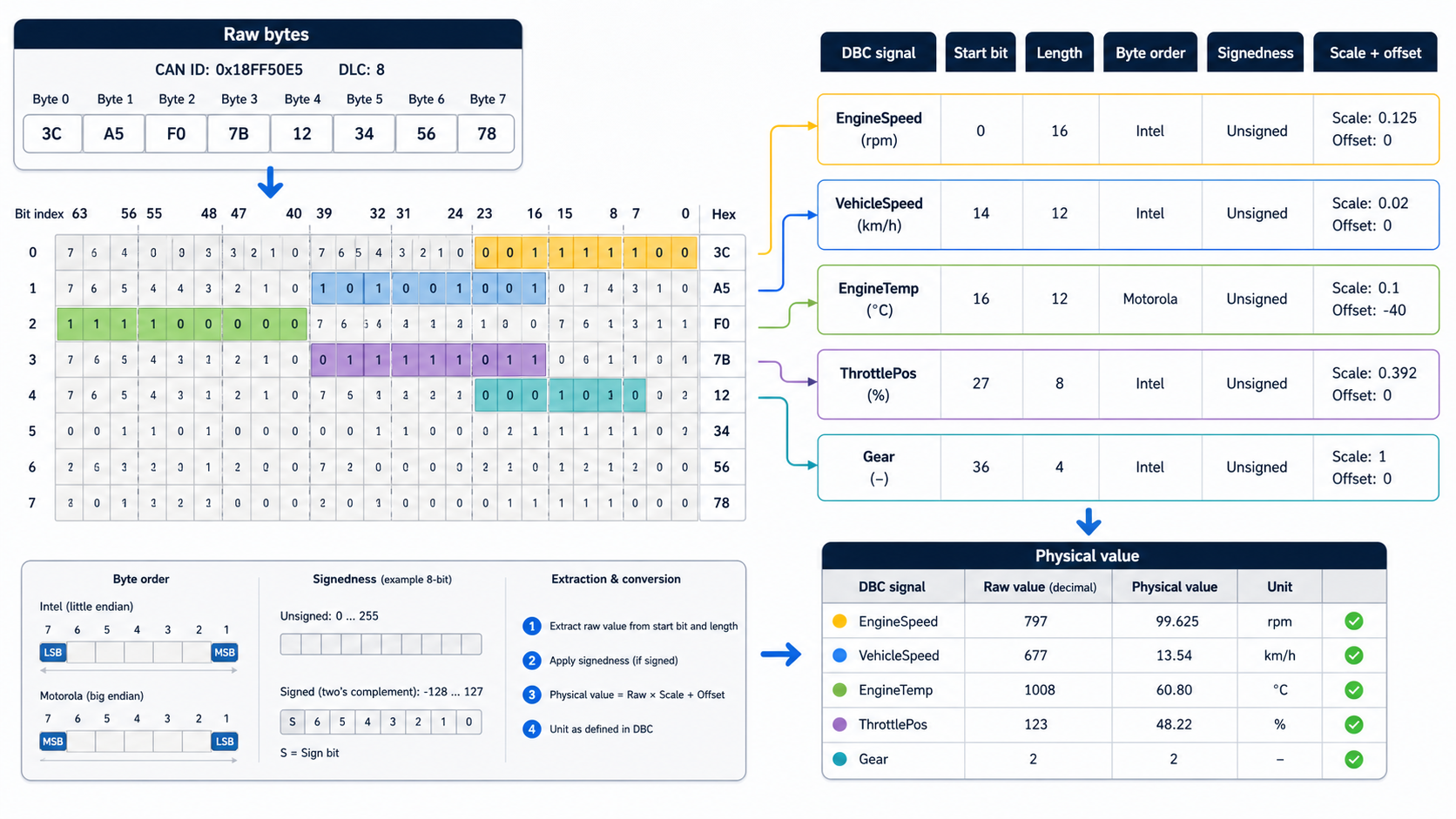
Raw CAN bytes are not engineering data
A CAN frame might look like this:
can0 321 [8] 68 13 FF FF 40 1F 00 00That line tells you the bus, identifier, payload length, and data bytes. It does not tell you the engine speed, battery current, gear, torque request, or temperature. To get those values, you need a database that defines what each bit means.
That is the job of a DBC file.
A DBC signal definition typically answers:
- Which CAN ID carries the signal?
- Where does the signal start?
- How many bits does it use?
- Is it little-endian or big-endian?
- Is it signed or unsigned?
- What scale and offset convert raw value to physical value?
- What unit should be shown?
- Is the signal multiplexed?
If one of those fields is wrong, the decoded value can look plausible and still be wrong.
The core formula
For a normal numeric signal, decoding follows this path:
raw_bits -> raw_integer -> physical_valueThe final conversion is usually:
physical_value = raw_value * scale + offsetEncoding is the reverse:
raw_value = (physical_value - offset) / scaleThen the raw integer is packed into the payload at the signal's bit position.
Example: a simple little-endian signal
Assume this signal definition:
Signal: EngineSpeed
Start bit: 24
Length: 16 bits
Byte order: little_endian
Signed: no
Scale: 0.125
Offset: 0
Unit: rpm
And this payload:
FF FF FF 68 13 FF FF FFBytes 3 and 4 are:
68 13For an Intel/little-endian signal, that becomes:
0x1368 = 4968Apply scale:
4968 * 0.125 = 621 rpmThat exact kind of conversion appears constantly in heavy-duty and vehicle CAN databases.
Why byte order causes so many bugs
Byte order is where many DBC mistakes hide.
In DBC language:
- Intel usually means little-endian.
- Motorola usually means big-endian.
The confusing part is not the names. The confusing part is bit numbering and how multi-byte signals cross byte boundaries. A one-byte signal is easy. A 13-bit or 16-bit signal crossing bytes is where engineers start seeing values that are off by a factor, mirrored, or jumping unexpectedly.
When a value looks wrong:
Expected: 621 rpm
Decoded: 26643 rpm
Check byte order before changing scale.
Signedness matters after bit extraction
Signedness tells the decoder how to interpret the extracted raw integer.
For an 8-bit unsigned signal:
0xFE = 254For an 8-bit signed two's-complement signal:
0xFE = -2That difference is huge for signals like current, torque, acceleration, steering angle, or temperature delta.
Scale and offset are not optional polish
Scale and offset convert raw bus values into physical values.
Example:
Signal: BatteryVoltage
Raw value: 4032
Scale: 0.01
Offset: 0
Unit: V
Physical: 40.32 V
Offset is common when the raw value is stored as an unsigned number but needs to represent a range around zero.
Signal: Temperature
Raw value: 90
Scale: 1
Offset: -40
Physical: 50 degC
If the offset is missing, every decoded value looks shifted.
Decode with cantools
Install:
python3 -m pip install cantoolsLoad a DBC and inspect a message:
import cantools

db = cantools.database.load_file("vehicle.dbc")

message = db.get_message_by_name("EngineData")
print(message.frame_id)
print(message.length)

for signal in message.signals:
    print(
        signal.name,
        signal.start,
        signal.length,
        signal.byte_order,
        signal.is_signed,
        signal.scale,
        signal.offset,
        signal.unit,
    )
Decode one frame:
import cantools

db = cantools.database.load_file("vehicle.dbc")

frame_id = 0x321
data = bytes.fromhex("6813FFFF401F0000")

decoded = db.decode_message(frame_id, data)
print(decoded)
The output might look like:
{
    "EngineSpeed": 621.0,
    "CoolantTemperature": 50,
    "TorqueRequest": 12.5
}
Encode with cantools
Encoding is useful for simulation, bench testing, and gateway validation.
import cantools

db = cantools.database.load_file("vehicle.dbc")
message = db.get_message_by_name("EngineData")

payload = message.encode({
    "EngineSpeed": 621.0,
    "CoolantTemperature": 50,
    "TorqueRequest": 12.5,
})

print(payload.hex(" ").upper())
Send it on a virtual CAN interface:
import can
import cantools

db = cantools.database.load_file("vehicle.dbc")
message_def = db.get_message_by_name("EngineData")

payload = message_def.encode({
    "EngineSpeed": 621.0,
    "CoolantTemperature": 50,
    "TorqueRequest": 12.5,
})

bus = can.Bus(channel="vcan0", interface="socketcan")
frame = can.Message(
    arbitration_id=message_def.frame_id,
    data=payload,
    is_extended_id=message_def.is_extended_frame,
)

bus.send(frame)
Then watch it:
candump vcan0Decode a candump log
For command-line decoding:
cat capture.log | python3 -m cantools decode vehicle.dbcFor compact output:
cat capture.log | python3 -m cantools decode --single-line vehicle.dbcFor plotting:
python3 -m pip install "cantools[plot]"
cat capture.log | python3 -m cantools plot vehicle.dbc "*Speed*" "*Temperature*"
This is a practical way to move from raw CAN logs to signal-level investigation.
Multiplexed messages need one more step
A multiplexed message uses one signal as a selector. The selector decides which other signals are valid in the payload.
Example:
Message: StatusFrame
Mux signal: Mode

Mode = 0:
  PackVoltage
  PackCurrent

Mode = 1:
  CellMinVoltage
  CellMaxVoltage
If the mux selector is wrong in the DBC, the decoder may extract the wrong set of signals from a valid frame. This is why multiplexer-aware DBC editing matters. You need to see the selector and dependent signals together.
DBC review checklist
When reviewing a DBC update, inspect:
- frame ID and extended-frame flag
- message length
- signal start bit
- signal length
- byte order
- signedness
- scale
- offset
- unit
- minimum and maximum
- receivers and senders
- value tables
- multiplexer configuration
- comments that explain non-obvious behavior
DBC Utility is built around exactly this kind of review. It is not just a file viewer. The value is seeing the message structure, signal metadata, edit context, and compare workflow together.