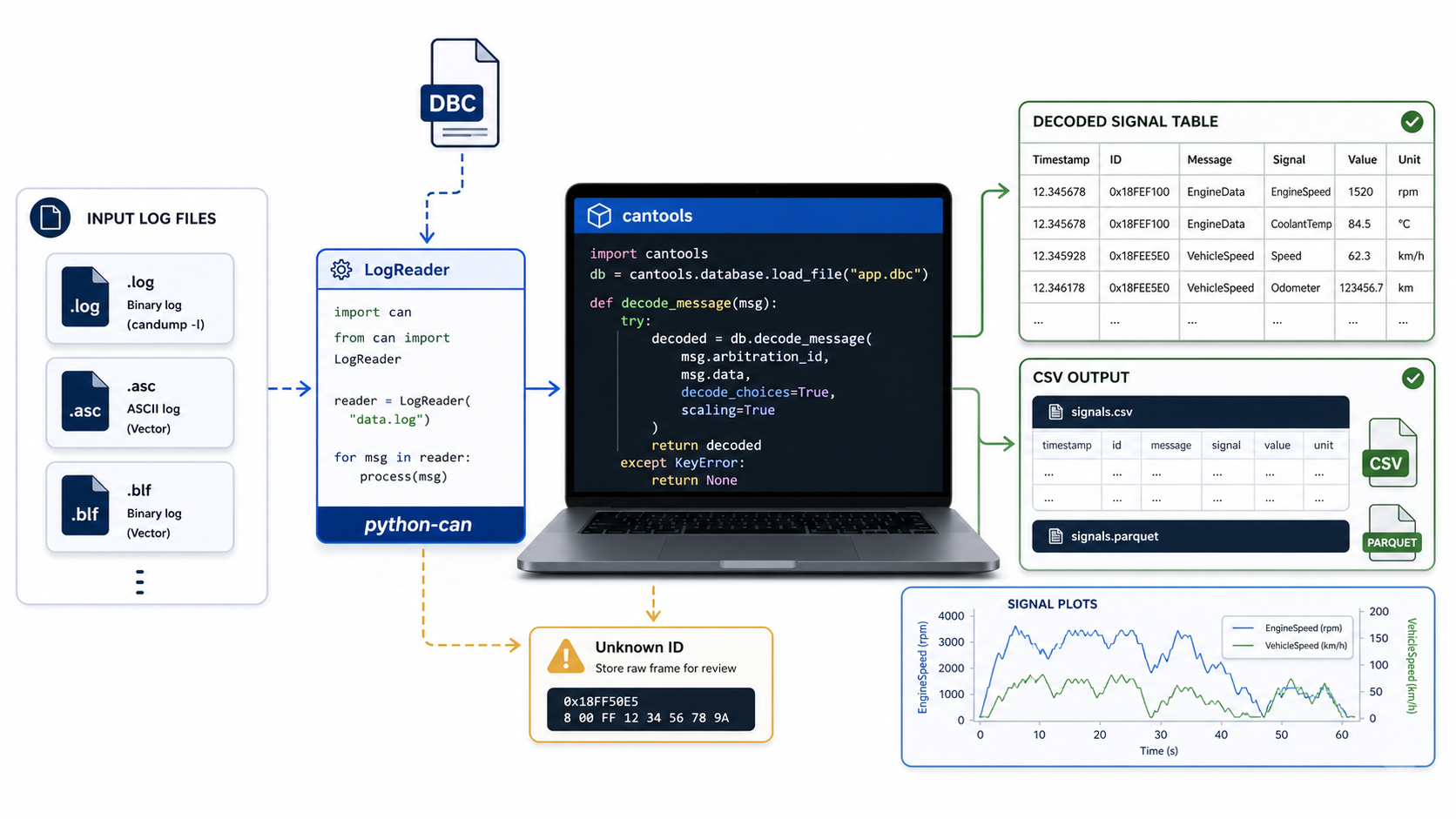
Why automate CAN log decoding
GUI tools are useful for inspection. Automation is useful when you need repeatable analysis.
A Python decode pipeline helps when you need to:
- decode many CAN logs
- compare DBC versions
- export signal data for plots
- check unknown frame IDs
- run validation in CI
- summarize test runs
- build quick diagnostics around a DBC file
Two common Python libraries are python-can for CAN message I/O and log handling, and cantools for DBC parsing and message decoding.
Install the tools
python -m pip install python-can cantools pandasFor simple scripts, pandas is optional. It is convenient for CSV export and analysis.
Load a DBC file
import cantools

db = cantools.database.load_file("vehicle.dbc")

print(f"Loaded {len(db.messages)} messages")
for message in db.messages[:5]:
    print(hex(message.frame_id), message.name)
If this fails, fix the DBC before debugging logs. A parser error usually means the script is not yet at the data-analysis stage.
Decode one frame manually
Start with one known message:
import cantools

db = cantools.database.load_file("vehicle.dbc")
message = db.get_message_by_frame_id(0x321)

payload = bytes.fromhex("68 13 FF FF 40 1F 00 00")
decoded = message.decode(payload, decode_choices=False)

print(decoded)
This proves your DBC and signal math work for one payload.
Decode a candump-style log
Many candump -L logs look like:
(1716381000.123456) can0 321#6813FFFF401F0000A small parser:
import re
import cantools
import pandas as pd

LINE = re.compile(
    r"^\((?P<ts>[0-9.]+)\)\s+(?P<iface>\S+)\s+"
    r"(?P<canid>[0-9A-Fa-f]+)#(?P<data>[0-9A-Fa-f]*)"
)

db = cantools.database.load_file("vehicle.dbc")
rows = []
unknown_ids = {}
decode_errors = []

with open("capture.log", "r", encoding="utf-8") as handle:
    for line_number, line in enumerate(handle, start=1):
        match = LINE.match(line.strip())
        if not match:
            continue

        timestamp = float(match.group("ts"))
        frame_id = int(match.group("canid"), 16)
        data = bytes.fromhex(match.group("data"))

        try:
            message = db.get_message_by_frame_id(frame_id)
        except KeyError:
            unknown_ids[frame_id] = unknown_ids.get(frame_id, 0) + 1
            continue

        try:
            decoded = message.decode(data, decode_choices=False)
        except Exception as exc:
            decode_errors.append((line_number, frame_id, str(exc)))
            continue

        for signal_name, value in decoded.items():
            rows.append(
                {
                    "timestamp": timestamp,
                    "frame_id": f"0x{frame_id:X}",
                    "message": message.name,
                    "signal": signal_name,
                    "value": value,
                }
            )

pd.DataFrame(rows).to_csv("decoded-signals.csv", index=False)

print("unknown IDs:", {hex(k): v for k, v in sorted(unknown_ids.items())})
print("decode errors:", decode_errors[:10])
This script is intentionally explicit. In real validation work, silent failures are expensive.
Keep timestamps
Do not throw away timestamps. Without timestamps you cannot calculate:
- signal rate
- missing-message gaps
- startup order
- event timing
- latency between cause and effect
- replay alignment
If the log has absolute timestamps, preserve them. If the log has relative timestamps, document the start time separately.
Handle unknown IDs properly
Unknown IDs are not automatically a failure. They can mean:
- the log contains frames outside the DBC scope
- the DBC is incomplete
- the wrong DBC version was used
- the vehicle variant is different
- the frame uses extended ID but was parsed incorrectly
Report unknown IDs with counts. Do not simply ignore them.
for frame_id, count in sorted(unknown_ids.items(), key=lambda item: item[1], reverse=True):
print(f"0x{frame_id:X}: {count}")
If a high-frequency ID is unknown, it is worth investigating.
Export wide signal tables when needed
Long format is useful for storage:
timestamp,frame_id,message,signal,valueWide format is useful for plots:
timestamp,EngineSpeed,VehicleSpeed,BatteryVoltageConvert with pandas:
df = pd.DataFrame(rows)
wide = df.pivot_table(
    index="timestamp",
    columns="signal",
    values="value",
    aggfunc="last",
)
wide.to_csv("decoded-wide.csv")
For asynchronous CAN signals, do not assume all values update at the same timestamp. If you forward-fill values, document that choice.
Plot a signal quickly
import pandas as pd
import matplotlib.pyplot as plt

df = pd.read_csv("decoded-signals.csv")
engine = df[df["signal"] == "EngineSpeed"]

plt.plot(engine["timestamp"], engine["value"])
plt.xlabel("time")
plt.ylabel("EngineSpeed")
plt.grid(True)
plt.show()
A plot catches problems faster than a table when scale, byte order, or signedness is wrong.
Decode BLF or ASC logs
python-can includes log readers for several formats depending on installation and format support.
The general pattern:
import can
import cantools

db = cantools.database.load_file("vehicle.dbc")

reader = can.LogReader("capture.asc")
for msg in reader:
    if msg.is_error_frame or msg.is_remote_frame:
        continue
    try:
        decoded = db.decode_message(msg.arbitration_id, msg.data, decode_choices=False)
    except Exception:
        continue
    print(msg.timestamp, hex(msg.arbitration_id), decoded)
Always test the reader on a small known file first. Log formats differ in metadata, channel naming, timestamps, and CAN FD handling.
Use DBC Utility before writing code
Before building automation, open the DBC in a viewer and inspect the messages you care about. Check:
- frame ID
- message length
- signal start bits
- scale and offset
- units
- multiplexing
- comments
Automation should encode a workflow you already understand. It should not hide a DBC you have never reviewed.
Related reading: