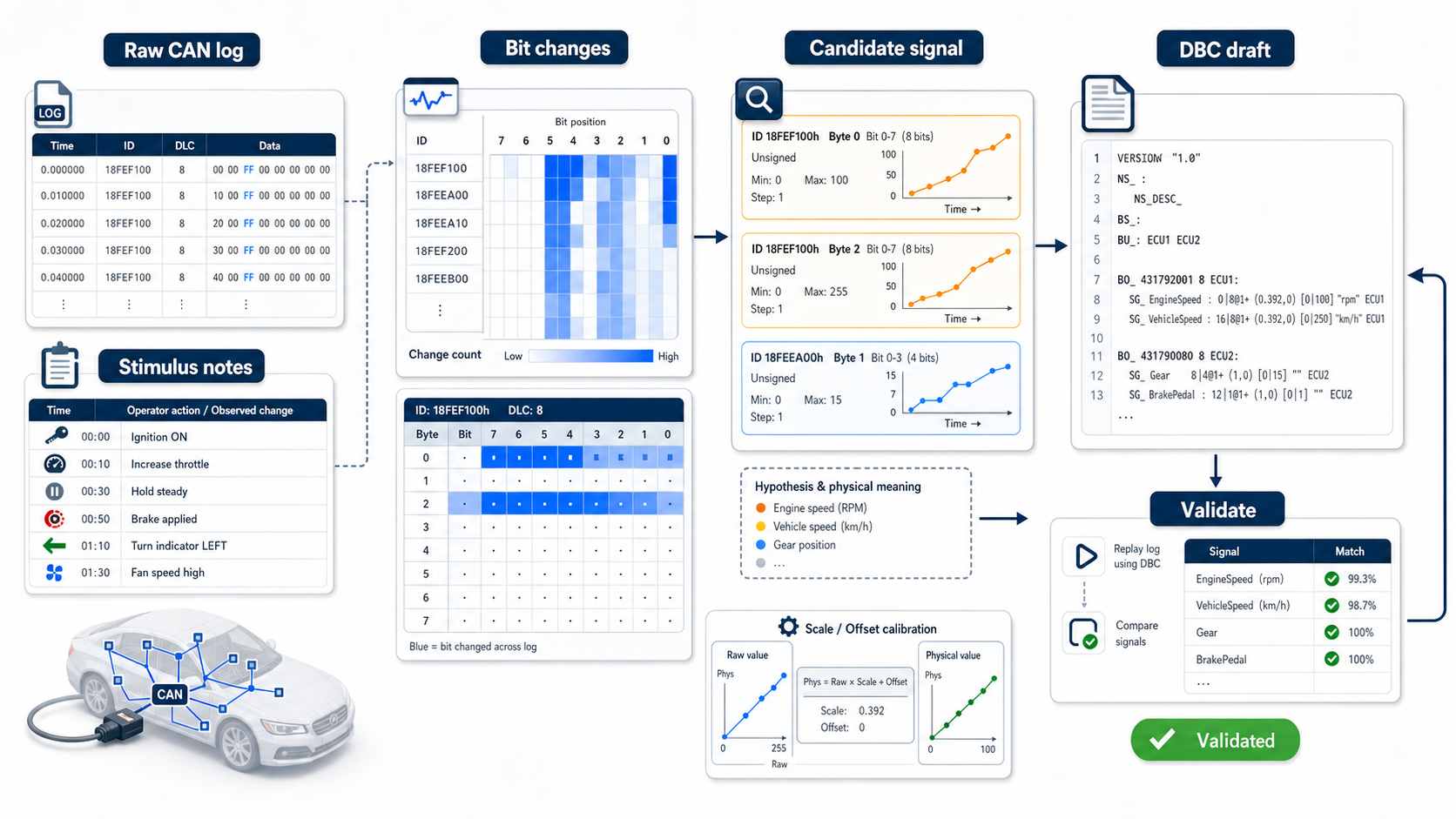
Start with the safety and ownership boundary
Reverse engineering CAN signals should be done only on systems you own, maintain, or are authorized to test. Do not connect to vehicles, machines, or networks where you do not have permission.
This guide is about legitimate engineering work:
- prototypes
- internal test benches
- robotics platforms
- lab ECUs
- legacy equipment your team owns
- missing documentation recovery
- DBC cleanup for authorized projects
The goal is not to hack a vehicle. The goal is to turn known raw CAN behavior into a useful DBC file.
What a DBC can and cannot prove
A DBC describes how to decode CAN frames into named signals. It can represent frame IDs, signal positions, lengths, byte order, signedness, scale, offset, units, choices, comments, and multiplexing.
A DBC does not prove that your signal interpretation is correct. Your evidence does.
You need:
- repeatable captures
- controlled input changes
- physical measurements
- known operating states
- validation against fresh logs
- conservative notes for uncertain signals
Capture baseline logs
Start with stable captures before changing anything.
sudo ip link set can0 down
sudo ip link set can0 type can bitrate 500000
sudo ip link set can0 up

candump -tz -L can0 > baseline-idle.log
Record context:
Date: 2026-05-22
System: bench controller A
Bitrate: 500 kbit/s
State: powered, idle, no manual input
DBC candidate version: none
Notes: all outputs disabled
Bad notes create bad reverse engineering. Write down what the system was doing.
Use controlled stimulus
Change one thing at a time.
Examples:
- press one switch
- change one analog input
- command one motor speed
- heat one sensor
- change one mode
- apply one known load
Capture each condition:
candump -tz -L can0 > stimulus-motor-1000rpm.log
candump -tz -L can0 > stimulus-motor-2000rpm.log
candump -tz -L can0 > stimulus-switch-on.log
Keep the stimulus name in the filename. Future you will need it.
Find active frame IDs
Count IDs:
from collections import Counter

ids = Counter()

with open("baseline-idle.log", "r", encoding="utf-8") as handle:
    for line in handle:
        parts = line.split()
        if len(parts) >= 3 and "#" in parts[2]:
            can_id = parts[2].split("#", 1)[0]
            ids[can_id] += 1

for can_id, count in ids.most_common():
    print(can_id, count)
High-frequency IDs are often control/status frames. Low-frequency IDs may be diagnostics, state changes, or event-driven messages.
Compare logs by stimulus
Look for IDs whose payload changes with the physical action.
Simple byte-change comparison:
from collections import defaultdict

def load_payloads(path):
    frames = defaultdict(list)
    with open(path, "r", encoding="utf-8") as handle:
        for line in handle:
            parts = line.split()
            if len(parts) >= 3 and "#" in parts[2]:
                can_id, data = parts[2].split("#", 1)
                frames[can_id].append(bytes.fromhex(data))
    return frames

idle = load_payloads("baseline-idle.log")
active = load_payloads("stimulus-motor-2000rpm.log")

for can_id in sorted(set(idle) & set(active)):
    idle_values = set(idle[can_id])
    active_values = set(active[can_id])
    if idle_values != active_values:
        print("changed", can_id, len(idle_values), len(active_values))
This only tells you where to look. It does not identify the signal yet.
Look for bit fields, not just bytes
Many CAN signals are not byte-aligned. A 12-bit or 13-bit signal can cross byte boundaries.
Useful checks:
- which bits change with stimulus
- whether the value increases monotonically
- whether byte order appears little-endian or big-endian
- whether the value is signed
- whether a value saturates or wraps
- whether a field changes only in certain modes
A quick bit dump:
payload = bytes.fromhex("6813FFFF401F0000")
bits = "".join(f"{byte:08b}" for byte in payload)
print(bits)
For real work, write scripts that compare bit positions across captures.
Build candidate signals conservatively
For each candidate signal, record:
Frame ID: 0x321
Candidate name: MotorSpeed_Raw
Start bit: 8
Length: 16
Byte order: little-endian candidate
Signed: no
Evidence: increases with commanded motor speed
Known points:
  raw 1000 -> approx 500 rpm
  raw 2000 -> approx 1000 rpm
Confidence: medium
Do not pretend uncertain signals are proven. Use comments or working names until validated.
Estimate scale and offset
If you have two known physical points, estimate scale:
raw_a = 1000
phys_a = 500.0
raw_b = 2000
phys_b = 1000.0

scale = (phys_b - phys_a) / (raw_b - raw_a)
offset = phys_a - raw_a * scale

print(scale, offset)
Then test against a third point. Two points can fit the wrong interpretation.
Draft a minimal DBC
Start small. Add one message and a few signals you can defend.
Example sketch:
BO_ 801 MotorStatus: 8 Vector__XXX
SG_ MotorSpeed : 8|16@1+ (0.5,0) [0|8000] "rpm" Vector__XXX
SG_ MotorCurrent : 24|16@1- (0.1,0) [-500|500] "A" Vector__XXX
Then load it with tooling:
python -m cantools dump candidate.dbcOpen it in DBC Utility and inspect the message layout before adding more.
Validate against fresh logs
Do not validate only against the logs used to discover the signal.
Capture a fresh log:
candump -tz -L can0 > validation-run.logDecode with the candidate DBC:
import cantools

db = cantools.database.load_file("candidate.dbc")

with open("validation-run.log", "r", encoding="utf-8") as handle:
    for line in handle:
        parts = line.split()
        if len(parts) >= 3 and "#" in parts[2]:
            can_id_text, data_text = parts[2].split("#", 1)
            can_id = int(can_id_text, 16)
            try:
                print(db.decode_message(can_id, bytes.fromhex(data_text), decode_choices=False))
            except Exception:
                pass
Look for values that are plausible across the full operating range, not just at one point.
Know when not to name a signal
If you cannot prove meaning, do not give it a confident engineering name.
Bad:
EngineTorqueCommandBetter while still investigating:
Unknown_321_24_12_CandidateGood DBC ownership is honest about uncertainty.
Where DBC Utility fits
DBC Utility helps during DBC drafting and review:
- inspect candidate messages
- edit signal definitions
- compare candidate revisions
- review bit layout changes
- keep notes visible while the DBC evolves
The evidence still comes from controlled tests and logs. The tool helps you keep the database clean while that evidence improves.
Related reading: