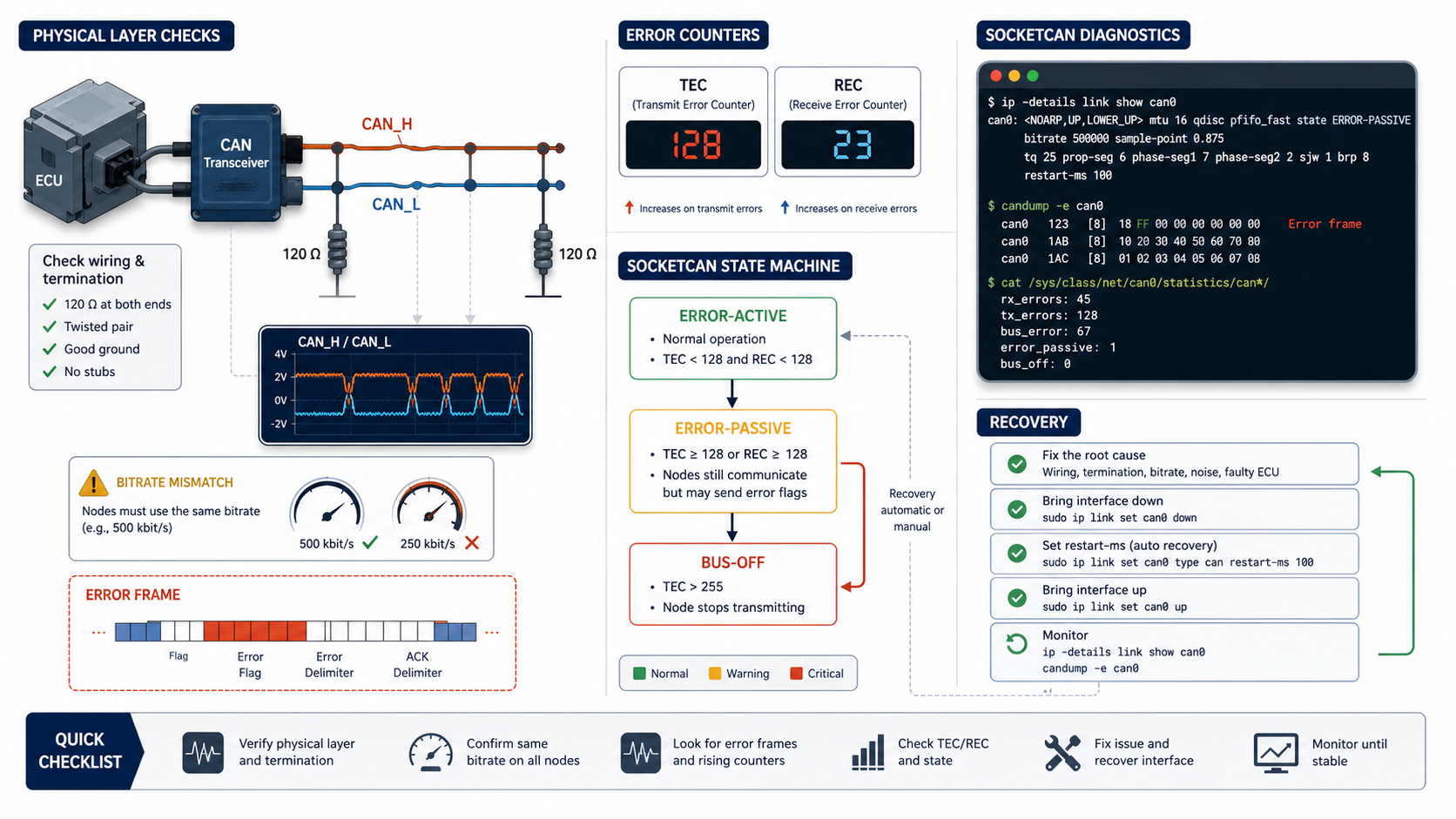
Why bus-off deserves a serious debug process
If a CAN interface goes bus-off, the controller has stopped participating on the bus because it detected too many transmission errors.
That is not something to fix by blindly restarting the interface. Restarting can be useful during controlled testing, but the real question is:
Why did the controller reach bus-off?Common causes:
- wrong bitrate
- wrong CAN FD data bitrate
- missing or incorrect termination
- CAN_H and CAN_L wiring issues
- bad ground reference
- transceiver power or standby state
- no other node acknowledging frames
- broken cable or connector
- sending frames onto a bus you should only monitor
- electrical noise or overloaded network
Start with evidence, not guesses.
CAN error states in plain language
CAN controllers maintain error counters. The two important ones are usually:
- TEC: transmit error counter
- REC: receive error counter
As errors accumulate, a node moves through states:
error-active -> error-passive -> bus-offError-active is normal operation. Error-passive means the controller is still on the bus but has reduced its ability to disturb traffic. Bus-off means the controller has disconnected itself from the bus from the protocol point of view.
Bring up the interface with diagnostics visible
For classical CAN:
sudo ip link set can0 down
sudo ip link set can0 type can bitrate 500000
sudo ip link set can0 up
ip -details -statistics link show can0
For CAN FD:
sudo ip link set can0 down
sudo ip link set can0 type can bitrate 500000 dbitrate 2000000 fd on
sudo ip link set can0 up
ip -details -statistics link show can0
Do not guess these values on a real network. A wrong nominal bitrate or data bitrate can produce exactly the kind of failure that looks like a bad adapter.
Capture error frames
Subscribe to ordinary traffic and all available error-report classes, with readable error display:
candump -e 'can0,0:0,#FFFFFFFF'For timestamps and log output:
candump -L 'can0,0:0,#FFFFFFFF' > can-errors.logError frames are not normal data frames. They are diagnostic evidence from the CAN controller and driver. They can point toward acknowledgment errors, bus-off, controller state changes, or other low-level conditions depending on hardware and driver support.
The -e option controls readable display; the #FFFFFFFF filter requests error reports. SocketCAN reports contain diagnostic metadata rather than an ECU's application payload. For the distinction and annotated examples, see CAN frame types explained.
Check interface state after a failure
Run:
ip -details -statistics link show can0Look for:
- interface state
- bitrate and sample point
- restart-ms setting
- bus error counters
- RX and TX error counts
- dropped frames
- bus-off indicators
If the interface reports bus-off, do not immediately erase the evidence. Capture the state first.
Use a safe recovery setting during development
SocketCAN can automatically restart an interface after bus-off:
sudo ip link set can0 down
sudo ip link set can0 type can bitrate 500000 restart-ms 100
sudo ip link set can0 up
For CAN FD:
sudo ip link set can0 down
sudo ip link set can0 type can bitrate 500000 dbitrate 2000000 fd on restart-ms 100
sudo ip link set can0 up
restart-ms can keep tests running, but it can also hide a real physical-layer problem if you only look at the final application behavior. Log the errors.
Manual restart:
sudo ip link set can0 type can restartUse manual restart when you want to freeze and inspect the failure first.
Physical-layer checks before software checks
Before blaming the DBC, the decoder, or the app, check the bus.
Basic checklist:
- correct bitrate
- correct CAN FD data bitrate
- two 120 ohm terminations on the bus ends
- about 60 ohms measured between CAN_H and CAN_L when powered down
- CAN_H and CAN_L not swapped
- adapter ground reference connected where required
- transceiver powered and not in standby
- no duplicate transmitters fighting over the same behavior
- at least one other active node acknowledges transmitted frames
If you are connected to a vehicle, use proper isolation and only test on networks you are authorized to access.
Acknowledgment errors are common during bench tests
A single CAN node transmitting alone usually does not receive ACK from another node. This prevents successful acknowledged communication. Inspect the controller's counters and state rather than assuming it must reach bus-off.
For bench testing, use at least two nodes or a known-good CAN adapter pair:
Terminal 1:
candump -e 'can0,0:0,#FFFFFFFF'Terminal 2:
cansend can0 123#1122334455667788If there is no other node to acknowledge, the transmit side may fail even though the adapter is working.
Separate bus health from DBC correctness
A DBC file cannot cause bus-off by itself. It can cause wrong decoded values, wrong signal names, or wrong engineering units. It does not change the physical bus unless your application uses the DBC to transmit frames.
Debug order:
- prove the interface is up
- prove bitrate and wiring are correct
- prove frames are received without error growth
- prove transmit is acknowledged if transmitting
- capture raw frames
- decode with the DBC
- validate signal meaning
Do not start at step 6.
Useful commands
Show CAN state:
ip -details -statistics link show can0Listen with errors:
candump -e -tz 'can0,0:0,#FFFFFFFF'Generate traffic on a lab bus:
cangen can0 -g 10Measure approximate bus load:
canbusload can0@500000Replay a known capture:
canplayer -I capture.logWhere DBC Utility fits
Use SocketCAN and can-utils to prove bus health. Use DBC Utility after the raw bus is trustworthy:
- inspect the DBC
- review frame IDs and signal definitions
- compare database revisions
- validate decoded behavior against logs
Related reading: