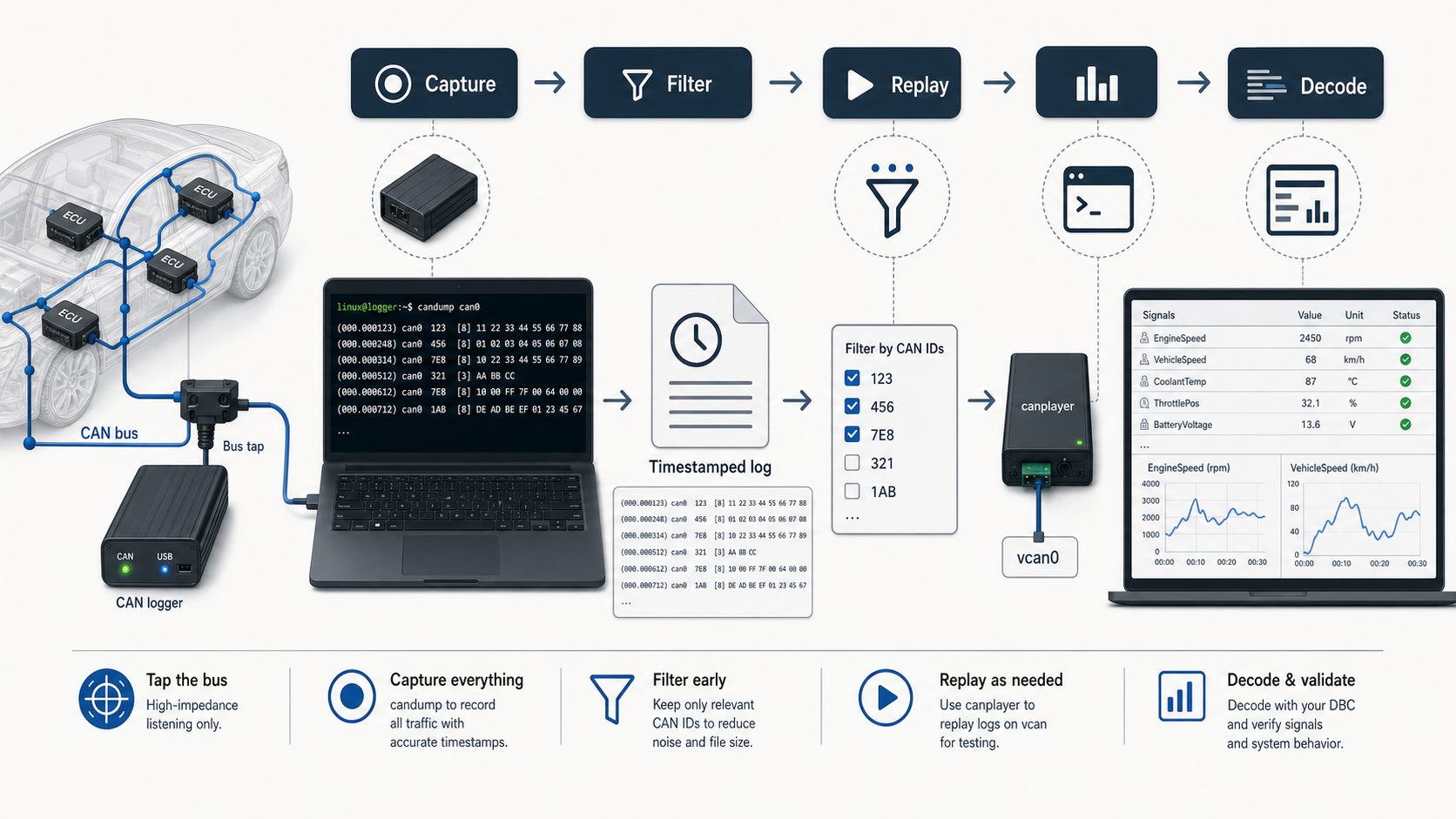
The problem with most CAN logs
A CAN log is easy to create and easy to ruin. The common failure mode is not "we forgot to record." It is "we recorded something but cannot use it."
Bad logs usually miss one of these:
- bitrate
- channel name
- timestamp quality
- CAN FD mode
- DBC version
- vehicle or bench state
- event marker
- exact reproduction steps
- whether the log is raw, filtered, decoded, or replayed
When the log is reviewed later, nobody can tell whether the signal is wrong, the DBC is wrong, the bus segment is wrong, or the capture setup was wrong.
The goal is simple: record CAN traffic in a way that another engineer can replay, decode, and audit.
Start with a capture checklist
Before running candump, write down the capture context.
Project: Battery bench bring-up
Date: 2026-05-22
Interface: can0
Protocol: Classical CAN
Bitrate: 500000
Hardware: USB-CAN adapter name / serial number
DBC: battery_network_v14.dbc
Test state: ignition on, charger connected, pack contactors open
Purpose: check BMS voltage and temperature frames
This looks boring. It saves hours.
If a capture is meant to support a DBC change, also record:
Old DBC: battery_network_v13.dbc
New DBC: battery_network_v14.dbc
Change under review: added PackCurrentRaw, corrected Temperature byte order
That makes compare review meaningful.
Bring up the interface explicitly
For classical CAN:
sudo ip link set can0 down
sudo ip link set can0 type can bitrate 500000
sudo ip link set can0 up
ip -details link show can0
For CAN FD:
sudo ip link set can0 down
sudo ip link set can0 type can bitrate 500000 dbitrate 2000000 fd on
sudo ip link set can0 up
ip -details link show can0
Do not rely on the interface being "probably already configured." Put the setup command in your test notes or script.
Confirm traffic before logging
Run a short live view:
candump -t a can0Check for:
- expected IDs
- non-zero payload changes
- no obvious error frames
- expected frame length
- stable timestamp cadence
If you expect ID 0x321 every 10 ms but it never appears, fix that before recording a long log.
Record a raw log
Use candump -l for a basic raw log:
candump -l can0For timestamp visibility while recording:
candump -t a -l can0For a focused capture around a known ID:
candump -t a -l can0,321:7FFFor several IDs:
candump -t a -l can0,321:7FF,322:7FF,400:7FFThe filter syntax matters. If you use a broad mask accidentally, your "small capture" may still include a full bus.
Add event markers without corrupting the raw log
The raw candump log should stay machine-readable. Put human event notes in a sidecar text file:
cat > capture-notes.txt <<'EOF'
00:00 start recording
00:15 ignition on
00:42 charger connected
01:10 current request changed from 0 A to 20 A
01:45 warning lamp appeared
02:05 stop recording
EOF
If you need precise event markers, use a separate signal or a controlled CAN frame from your test setup, but do not hand-edit the raw log unless you know every downstream parser can tolerate it.
Replay the log before sending it around
Replay catches bad captures early.
sudo modprobe vcan
sudo ip link add dev vcan0 type vcan
sudo ip link set up vcan0

canplayer vcan0=can0 -I candump-2026-05-22_190501.log
In another terminal:
candump vcan0If the replay works, you know the log is not just a pile of bytes. It can drive a decoder or a UI test again.
Decode against the exact DBC version
Install cantools:
python3 -m pip install cantoolsDecode:
cat candump-2026-05-22_190501.log | python3 -m cantools decode battery_network_v14.dbcIf you are reviewing a DBC change, decode with both versions:
cat capture.log | python3 -m cantools decode battery_network_v13.dbc > decoded-v13.txt
cat capture.log | python3 -m cantools decode battery_network_v14.dbc > decoded-v14.txt
diff -u decoded-v13.txt decoded-v14.txt | less
That tells you whether the DBC change actually changes the interpreted engineering values.
Use Python when you need repeatable checks
For quick QA, write a tiny script that checks for expected message presence and signal ranges.
import cantools
import re
from pathlib import Path

db = cantools.database.load_file("battery_network_v14.dbc")
line_re = re.compile(r"\((?P<ts>[\d.]+)\)\s+\w+\s+(?P<id>[0-9A-Fa-f]+)#(?P<data>[0-9A-Fa-f]*)")

seen = set()
violations = []

for line in Path("capture.log").read_text().splitlines():
    match = line_re.match(line)
    if not match:
        continue

    frame_id = int(match.group("id"), 16)
    data = bytes.fromhex(match.group("data"))

    try:
        message = db.get_message_by_frame_id(frame_id)
        decoded = message.decode(data)
    except KeyError:
        continue

    seen.add(message.name)

    for signal_name, value in decoded.items():
        signal = next((s for s in message.signals if s.name == signal_name), None)
        if signal and isinstance(value, (int, float)):
            if signal.minimum is not None and value < signal.minimum:
                violations.append((message.name, signal_name, value, "below minimum"))
            if signal.maximum is not None and value > signal.maximum:
                violations.append((message.name, signal_name, value, "above maximum"))

print("Decoded messages:", sorted(seen))
print("Range violations:", violations)
This does not replace engineering judgment. It catches obvious drift before a review meeting.
Keep the capture package together
For a useful handoff, package:
capture.log
capture-notes.txt
vehicle_network.dbc
README.txt
The README should include:
Interface: can0
Bitrate: 500000
Protocol: Classical CAN
Adapter: USB-CAN serial 12345
DBC SHA or version: battery_network_v14.dbc
Capture command: candump -t a -l can0
Replay command: canplayer vcan0=can0 -I capture.log
If the log will be used for QA, do not send only a screenshot of a plot. Send the raw log and the exact DBC.
Where DBC Utility fits
Once a log shows suspicious values, open the DBC in DBC Utility and inspect:
- message ID and extended-frame status
- signal start bit
- signal length
- byte order
- signedness
- scale and offset
- unit and min/max
- multiplexer selector and muxed signals
- changes between old and new DBC versions
The command line tells you what happened on the bus. A DBC editor tells you whether the database explains it correctly.