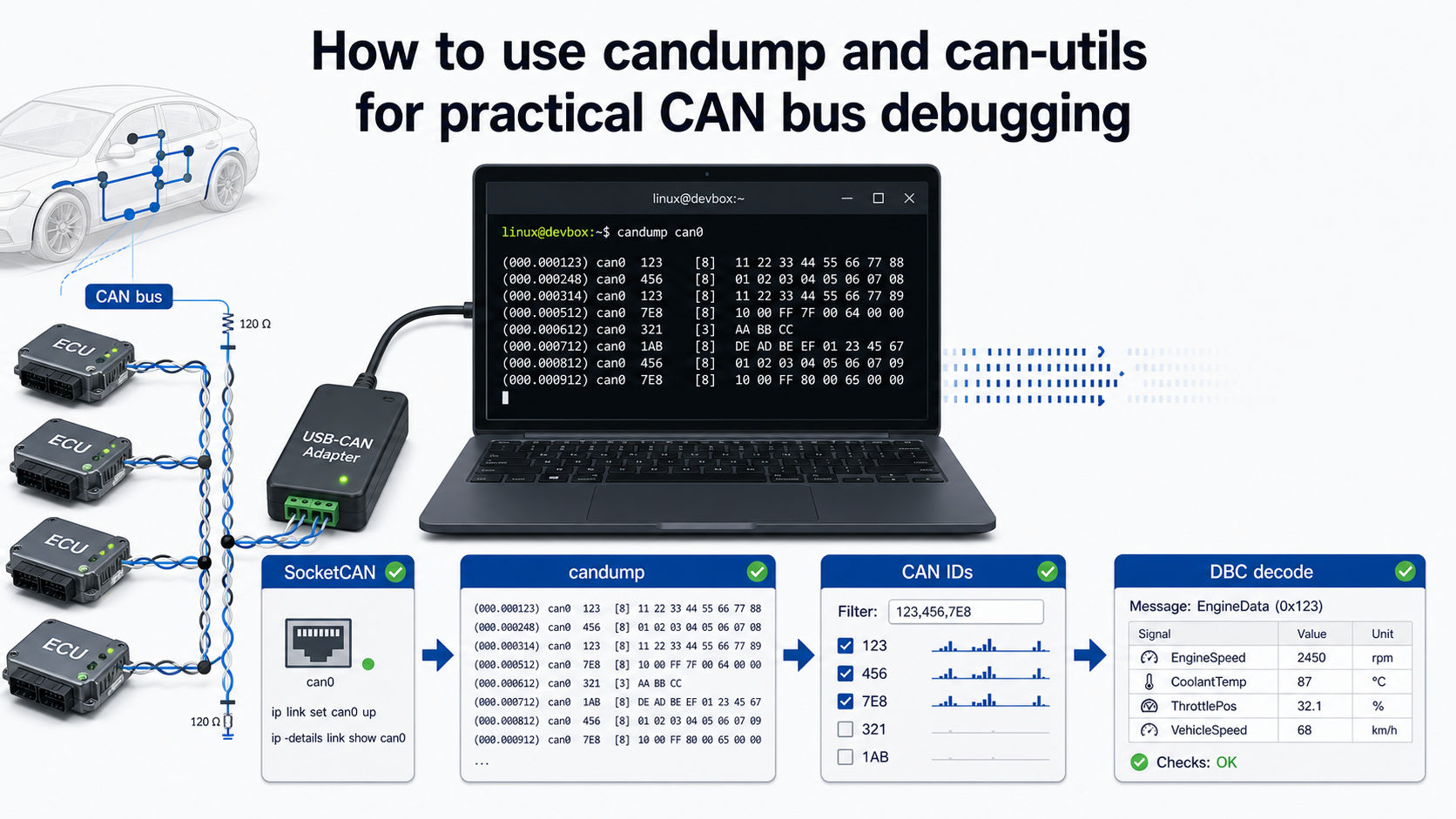
Why candump still matters
When a CAN bus problem is unclear, start with the simplest tool that can tell the truth. On Linux, that is usually SocketCAN plus can-utils.
SocketCAN exposes CAN controllers as network interfaces such as can0, can1, or vcan0. That design is useful because the Linux networking stack already knows how to handle sockets, filters, timestamps, and multiple applications reading from the same interface. The can-utils project then gives you small command-line tools on top of that interface: candump, cansend, cangen, canplayer, cansniffer, canbusload, and more.
For an engineer working with DBC files, candump is not the final destination. It is the first reality check. Before you ask whether a DBC signal is wrong, you need to know:
- Is the interface up?
- Is the bitrate correct?
- Are frames arriving?
- Are the expected CAN IDs present?
- Are the payload lengths classical CAN, CAN FD, or mixed?
- Does a replayed log reproduce the issue?
DBC Utility helps with the database side. candump helps with the raw bus side.
Install can-utils
On Debian or Ubuntu:
sudo apt update
sudo apt install can-utils
On Fedora:
sudo dnf install can-utilsOn Arch:
sudo pacman -S can-utilsThe exact package version depends on the distribution. For production benches, prefer a pinned distribution package or an internally approved package build so every tester uses the same tool behavior.
Start safely with vcan0
Before touching real hardware, use a virtual CAN interface. It behaves like a CAN interface from the application perspective, but it does not require a transceiver, wiring, or a vehicle.
sudo modprobe vcan
sudo ip link add dev vcan0 type vcan
sudo ip link set up vcan0
Now open one terminal and listen:
candump vcan0In another terminal, send a frame:
cansend vcan0 123#1122334455667788You should see something like:
vcan0 123 [8] 11 22 33 44 55 66 77 88This proves your userspace tools work before you introduce a USB-CAN adapter or vehicle wiring.
Bring up a real CAN interface
For classical CAN at 500 kbit/s:
sudo ip link set can0 down
sudo ip link set can0 type can bitrate 500000
sudo ip link set can0 up
ip -details link show can0
For CAN FD with nominal bitrate 500 kbit/s and data bitrate 2 Mbit/s:
sudo ip link set can0 down
sudo ip link set can0 type can bitrate 500000 dbitrate 2000000 fd on
sudo ip link set can0 up
ip -details link show can0
Do not guess the bitrate on a real vehicle network. If the bitrate is wrong, you will see errors or silence. If termination or wiring is wrong, you may disturb the network. Work on hardware you own or are authorized to test.
Capture traffic with timestamps
Basic capture:
candump can0Absolute timestamps:
candump -t a can0Delta timestamps:
candump -t d can0Log to a file:
candump -l can0candump -l writes a file named similar to:
candump-2026-05-22_190501.logThe log format is useful because many CAN tools can parse it later. A typical line looks like:
(1779476701.123456) can0 123#1122334455667788That line contains timestamp, interface, CAN ID, and payload. For DBC work, this is enough to decode signals if the matching database is available.
Filter IDs early
If a bus has hundreds of messages, raw candump can0 can become noise. Use filters.
Exact standard ID 0x123:
candump can0,123:7FFIDs from 0x100 to 0x1FF:
candump can0,100:700Two filters on one interface:
candump can0,123:7FF,456:7FFThe format is:
interface,can_id:can_maskThe filter passes frames where:
received_id & mask == can_id & maskFiltering is not just cosmetic. It keeps captures focused and makes later DBC review easier.
Replay a capture
If you captured a log with candump -l, replay it with canplayer.
canplayer -I candump-2026-05-22_190501.logReplay into a virtual interface:
canplayer vcan0=can0 -I candump-2026-05-22_190501.logThat mapping means: frames originally recorded on can0 are played onto vcan0. This is useful for testing a decoder, reproducing a bug, or demonstrating a tool without connecting to the real bus again.
Generate traffic for testing
Use cangen when you need synthetic traffic.
Generate random frames:
cangen vcan0Generate frames with a fixed ID:
cangen vcan0 -I 123Generate a fixed payload:
cangen vcan0 -I 123 -D 1122334455667788Send one frame repeatedly every 100 ms:
while true; do
  cansend vcan0 123#1122334455667788
  sleep 0.1
done
This is enough to test basic UI behavior, log handling, and DBC decode paths.
Decode candump output with a DBC
If you have a DBC file, cantools can decode candump output directly.
python3 -m pip install cantools
candump vcan0 | python3 -m cantools decode vehicle.dbc
For a log file:
cat candump-2026-05-22_190501.log | python3 -m cantools decode vehicle.dbcFor one-line output:
cat candump-2026-05-22_190501.log | python3 -m cantools decode --single-line vehicle.dbcThis is the bridge between raw capture and meaningful engineering values.
What to check before blaming the DBC
When decoded values look wrong, do not jump straight to "the DBC is bad." Check these in order:
- Interface bitrate
- CAN FD vs classical CAN mode
- Standard 11-bit vs extended 29-bit identifiers
- Endianness in the signal definition
- Start bit and signal length
- Signed vs unsigned interpretation
- Scale and offset
- Multiplexer selector value
- Whether the frame belongs to the expected bus segment
DBC Utility is useful at this stage because you can inspect message IDs, signal layout, scale, offset, byte order, and multiplexing in one desktop view instead of searching through a text file.
Practical workflow
For a new CAN issue, use this sequence:
# 1. Bring up the interface
sudo ip link set can0 down
sudo ip link set can0 type can bitrate 500000
sudo ip link set can0 up

# 2. Confirm traffic exists
candump -t a can0

# 3. Save a short capture
candump -l can0

# 4. Decode with a DBC
cat candump-*.log | python3 -m cantools decode vehicle.dbc

# 5. Inspect or edit the DBC
# Open vehicle.dbc in DBC Utility and review messages, signals, layout, and mux fields.
That workflow keeps raw data, decoded values, and database review connected.